Carrier Flow & Holdback
Mixmate manages carrier (water) two ways during a mix: it dilutes chemicals inline as they flow toward the tank, and it can reserve a portion of carrier at the end of the mix — called Holdback — for the final flush and rinse.
Inline Dilution
Section titled “Inline Dilution”A common question from operators is how Mixmate handles the traditional requirement of having the tank half-full of water before adding chemicals to ensure proper dilution and compatibility.
The Traditional Method
Section titled “The Traditional Method”In a manual setup, you typically:
Fill the tank 50% full with carrier (water/nitrogen).
Add your chemicals one by one while agitating.
Finish filling the remaining 50% with carrier.
The Mixmate Method: "Inline Dilution"
Section titled “The Mixmate Method: "Inline Dilution"”Mixmate achieves the same result—often more effectively—by using Inline Dilution. Instead of diluting the chemicals inside the sprayer tank, Mixmate dilutes them inside the hose on the way to the tank.
Constant Ratio: As the liquid flows, typically 50% to 70% of the volume in the hose is the carrier.
Immediate Mixing: Products are injected directly into this high-velocity carrier stream. They are diluted instantly before they ever reach the tank.
Compatibility: Because products are injected into a flowing stream of carrier, they rarely come into contact with each other in a concentrated form. This significantly reduces the risk of "jelling" or other compatibility issues seen in traditional mixing.
Why this is more efficient
Section titled “Why this is more efficient”By starting multiple items at the same time, Mixmate ensures that every drop of chemical enters the tank already mixed with the correct proportion of water. You don't have to wait for the tank to reach a certain level before starting—the "safe zone" for dilution is created the moment the flow begins.
Holdback
Section titled “Holdback”Tier: Included — requires a Carrier Control Kit on your machine.
Holdback is a safety feature that "reserves" a specific portion of your carrier (water). The Mixmate system monitors your progress and closes the main carrier valve when the user-defined holdback value is reached.
The Purpose: To ensure enough carrier remains at the end of the mix to:
Flush the main lines and pump to the final destination.
Rinse jugs in the inductor.
Execute all defined product rinse amounts.
Both settings below — Minimum Holdback Size and Starting Carrier Valve Position — are adjusted from the Mixmate Settings card on the Mix Preview screen:
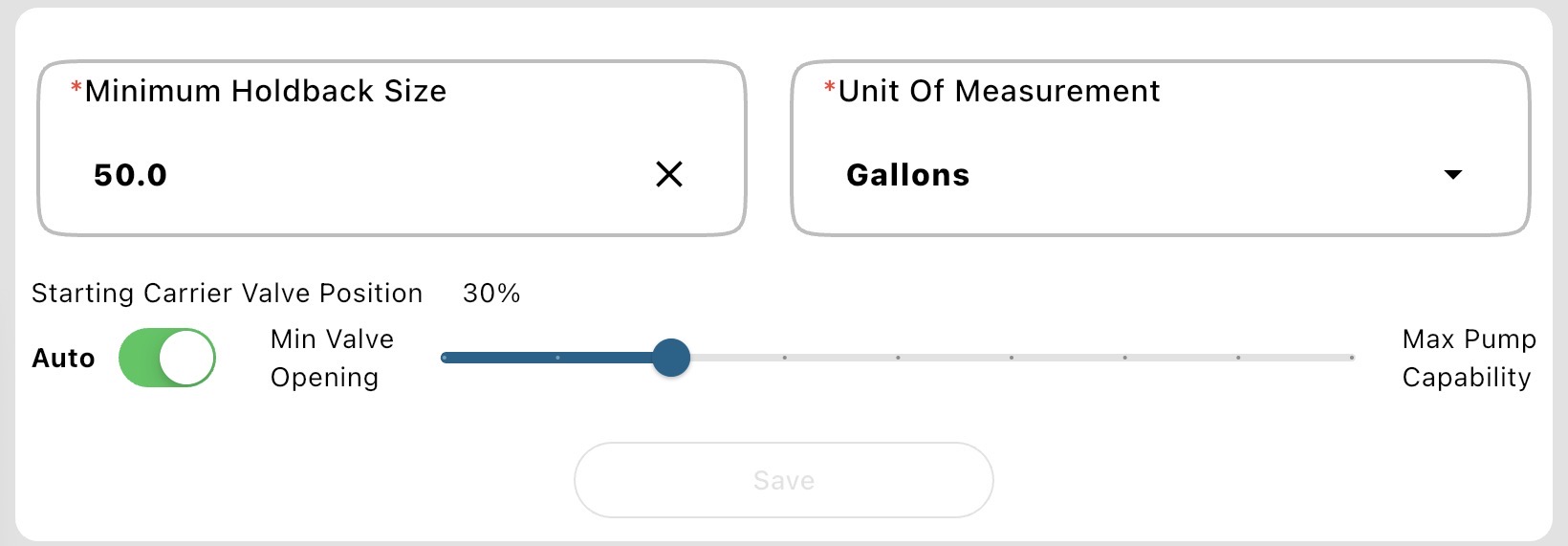
Minimum Holdback (Default 50 Gallons)
Section titled “Minimum Holdback (Default 50 Gallons)”The Logic: If the system reaches your "Minimum Holdback" limit while products are still being added, carrier flow will pause until the products are finished.
The Result: You avoid a "dry pipe" scenario where the mix is finished, but the lines are still full of chemical.
Important Note: Defining too small of a holdback value does not guarantee a full system flush and can cause an "overrun" of your mix size due to excessive rinsing.
Calculating Your Holdback Value & Best Practices
Section titled “Calculating Your Holdback Value & Best Practices”To find your ideal holdback setting, add up:
Main Line Volume: Estimated volume to flush to the destination.
Inductor Rinse: Volume needed for jug/tank rinsing.
Product Rinses: Total of all programmed rinse amounts.
The "Ratio" Rule:
Large Carrier % of Mix: Requires a smaller percentage of the total for holdback.
Small Carrier % of Mix: Requires a larger percentage of the total for holdback.
Partial Valve Position
Section titled “Partial Valve Position”What does the partial valve postion do for you? This setting allows the operator to balance Carrier Flow Speed and Product Flow Speed.
Partial Valve Setting (Default 30): This is the target opening percentage for the carrier valve while products are moving. 30% usually allows high flow while maintaining a strong vacuum to pull products.
Suction Priority: If product induction is slow, set the Partial Valve Position lower (toward 20) to increase vacuum. Likewise, if product induction is too fast, set the Partial Valve Position higher (toward maximum pump capacity) to decrease vacuum.
Flow Balancing: Prevents the carrier from "outrunning" the chemical induction, protecting your holdback reserve.
Automatic Throttling
Section titled “Automatic Throttling”Automatic Throttling: The system dynamically adjusts the valve between a Minimum of 20 (ensuring some carrier is always moving) and the Maximum Valve Position identified while running your Profile Main Pump wizard.
Automated Flow Balancing: Optimizes the Suction Priority and Flow Balancing to protect your holdback reserve, and prevent pump surging or cavatation.
Won't turn on? Auto stays disabled until you've run the Profile Main Pump Wizard — the system needs that wizard's Maximum Valve Position result before it can calculate a throttling range.
Summary of Mix Logic
Section titled “Summary of Mix Logic”Start: Mixmate runs carrier and products simultaneously.
Monitor: Constantly compares Total Carrier Remaining vs. Minimum Holdback.
Pause: If the two numbers match, the carrier valve closes while products finish.
Finish: Once products are 100% done, the carrier valve re-opens to use the "Holdback" water for the final rinse and flush.
Why Is My Chemical Going In Slowly?
Section titled “Why Is My Chemical Going In Slowly?”Thicker products, such as Atrazine, have a higher viscosity and don't flow as easily as thinner products like crop oil or water. While some slowdown is normal for "heavy" chemicals, check the following to get the best possible flow rate:
Product Agitation: If a product is prone to settling or separating, it becomes significantly thicker at the bottom of the tank or tote. Ensure the product is agitated thoroughly before starting the mix — uniform consistency ensures the pump and meter aren't struggling with "slugs" of settled concentrate.
Filter Screens: Every gear meter is protected by an upstream filter, and a partially clogged screen will significantly restrict flow, especially with high-viscosity chemicals — see How Often Should I Clean My Filters? for cleaning intervals.
Carrier Valve Position: See Partial Valve Position above — if the carrier valve is too wide open, the pump takes the "path of least resistance" (the water/carrier) and won't pull thick chemicals efficiently. Try decreasing the Partial Valve Position on the Mix Preview page to increase suction.
Auto Settings: Make sure Automatic Throttling is turned on so the system can balance carrier flow against chemical induction automatically.
Add a Booster Pump: If you consistently deal with high volumes of thick product, you may need to add a dedicated pump to that specific product line to assist the flow.
Flow Limit Warning: Monitor your flow rate carefully — do not exceed 35 gallons per minute (GPM), the maximum rated capacity of the Mixmate gear meters. Exceeding this can cause inaccurate readings or mechanical failure.