Connect to an Existing Scale
Use these instructions to integrate a third-party scale system (such as those found on pre-existing tanks or mobile platforms) into the Mixmate master controller.
1. Identify the Connection Point
Section titled “1. Identify the Connection Point”Locate the wiring terminal inside the scale display unit or within the junction box where the individual load cell cables are combined.
2. The 5-Volt Threshold Test
Section titled “2. The 5-Volt Threshold Test”Before wiring, you must verify the existing system provides enough power to be "read" by the Mixmate.
The Test: Use a digital multimeter to measure the voltage between Excitation+ (may be labeled Reference+ or V+) and Excitation- (may be labeled Reference- or V-).
The Result: If the measured value is less than 5 Volts, connecting to the existing system is not compatible.
3. Pinout Configuration
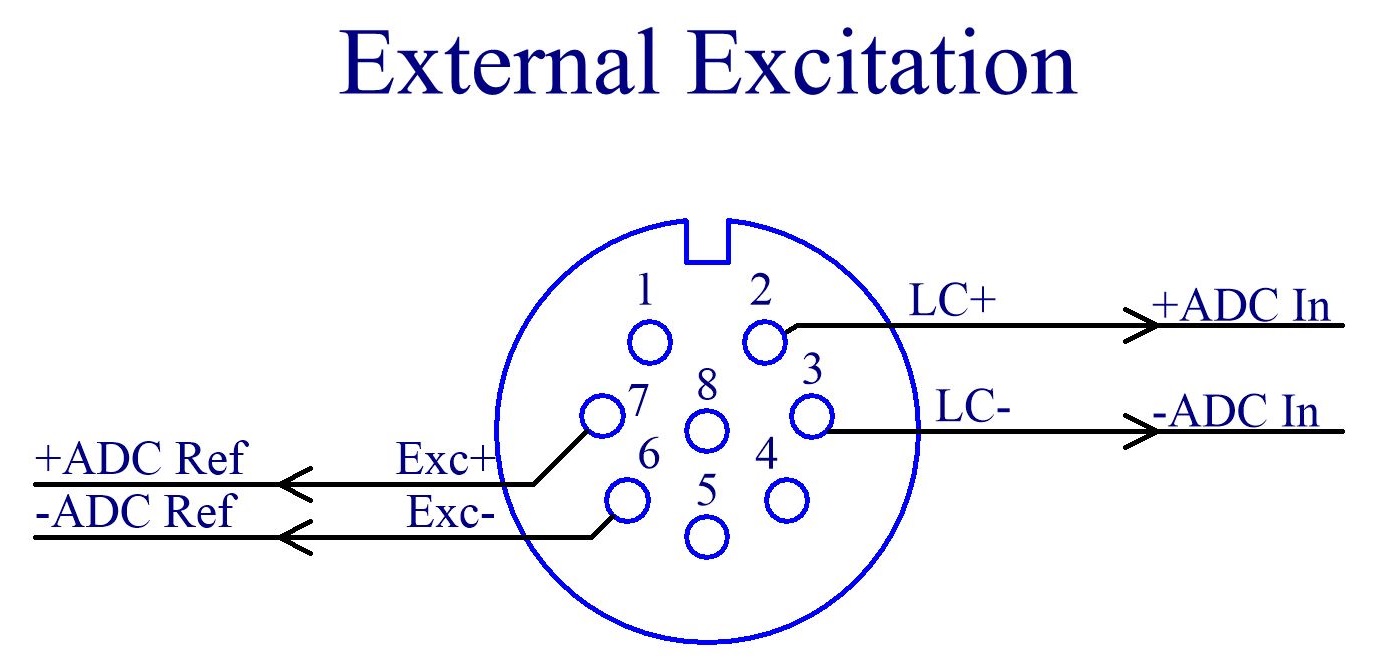
Section titled “3. Pinout Configuration”Once the 5-volt threshold is confirmed, connect the wires to the Mixmate interface as follows:
| Scale Component Label | Mixmate Pin |
| Excitation+ (Reference+ or V+) | Pin 7 |
| Excitation- (Reference- or V-) | Pin 6 |
| Load Cell+ (Signal+) | Pin 2 |
| Load Cell- (Signal-) | Pin 3 |
[!IMPORTANT]
Always refer to the manufacturer’s owners manual for your specific scale brand to confirm wire colors and labels before making connections.